

Key Takeaways
- OLED pixels produce their own light, while LCD pixels block or pass light from a separate backlight.
- OLED delivers true black by turning off individual pixels; LCD black is limited by backlight bleed.
- LCD panels generally sustain higher peak brightness, making them easier to read in direct sunlight.
- OLED screens can conserve battery when displaying dark content; LCD power draw stays relatively constant.
- OLED carries a risk of permanent image retention (burn-in) with static, high-contrast elements over time.
- Choosing between them depends on your primary use case, viewing environment, and how long you keep a device.
Option A
OLED (Organic Light-Emitting Diode)
The self-emitting technology delivering pixel-perfect contrast.
Best for: Users who prioritize deep blacks, vivid color, and efficient power use in dark-content scenarios.
Option B
LCD (Liquid Crystal Display)
The proven, backlit workhorse of modern screens.
Best for: Users who need consistent peak brightness, longer display longevity, and a lower risk of image retention.
If you mostly watch movies or shows in dim environments
OLED (Organic Light-Emitting Diode)
OLED's ability to turn individual pixels off creates true blacks and exceptional contrast that cinema-style content benefits from enormously.
If you use your device primarily outdoors or in brightly lit rooms
LCD (Liquid Crystal Display)
LCD panels can sustain higher consistent peak brightness, making screen content legible even under direct sunlight where OLED can struggle.
If battery efficiency is your top priority on a smartphone
OLED (Organic Light-Emitting Diode)
OLED consumes significantly less power when displaying dark UI themes or dark-mode apps, which can extend usage time meaningfully.
If you leave static images or interfaces on screen for long periods
LCD (Liquid Crystal Display)
LCD technology does not suffer from organic pixel degradation, so it carries no meaningful risk of burn-in from fixed on-screen elements.
If you want the widest color volume and most accurate per-pixel color control
OLED (Organic Light-Emitting Diode)
Because each OLED sub-pixel controls its own emission, color and luminance precision per pixel is unmatched by traditional LCD backlighting systems.
How Each Technology Produces an Image
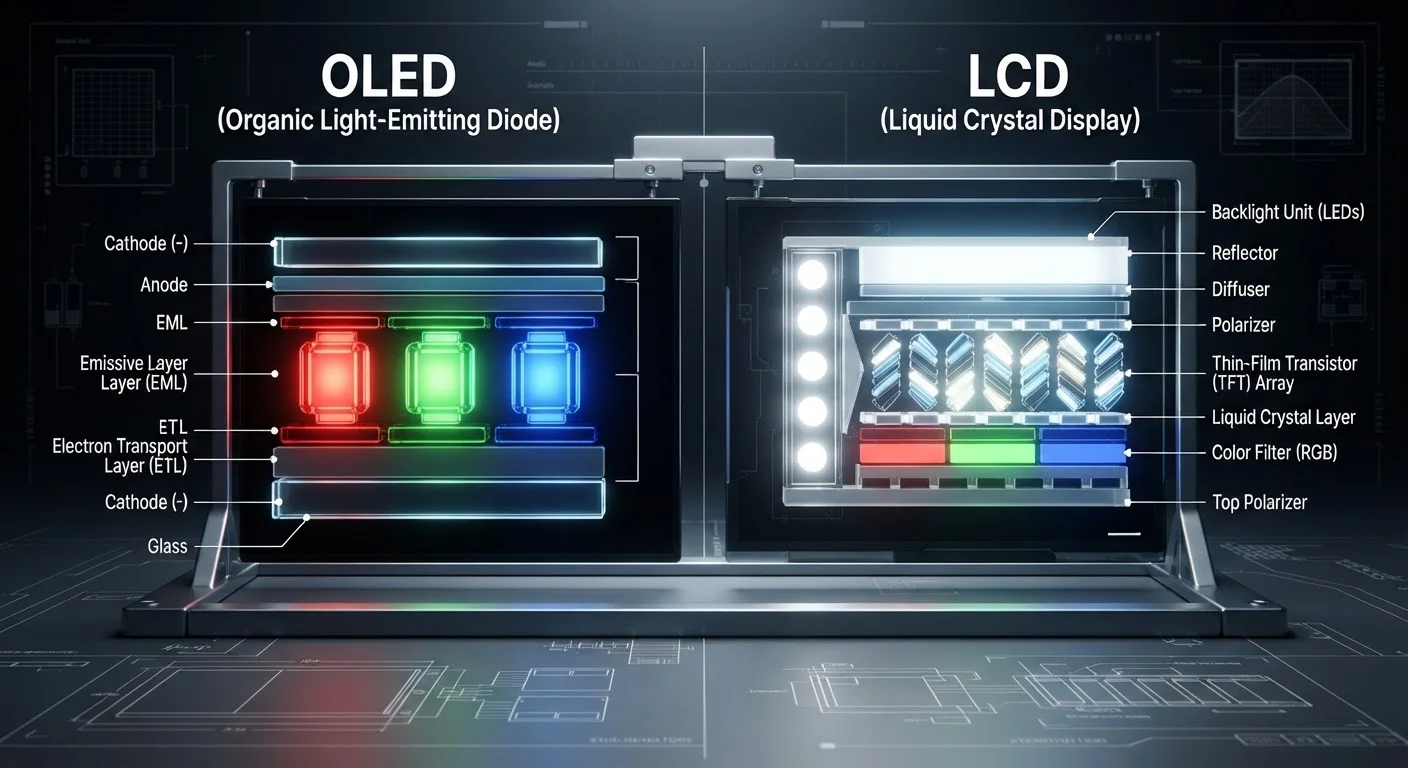
The single most important difference between OLED and LCD lies in where the light comes from. Understanding this one fact explains nearly every performance difference you'll notice in real life.
An LCD (Liquid Crystal Display) uses a panel of liquid crystals sandwiched between two polarized filters. Behind this panel sits a backlight - typically an array of LEDs - that stays on constantly while the screen is active. The liquid crystals act as microscopic shutters: they rotate to block or allow the backlight to pass through, and color filters in front produce the red, green, and blue values you see. Because the backlight is always illuminated, some light inevitably leaks through even when a pixel is supposed to be showing black.
An OLED (Organic Light-Emitting Diode) panel works entirely differently. Each pixel is its own light source, made from a thin layer of organic compounds that emit light when an electrical current runs through them. There is no backlight at all. To display black, an OLED simply turns that pixel off - it emits zero light. This is why OLED blacks appear truly black rather than dark grey.
For a broader look at how these technologies compare to a third option, see our panel technology explainer covering OLED, QLED, and LCD side by side.
| Criterion | OLED | LCD |
|---|---|---|
| Light source | Each pixel emits its own light | Separate backlight behind the panel |
| Black level | True black (pixel off = zero light) | Dark grey (backlight leakage) |
| Contrast ratio | Effectively infinite | Thousands to one (with local dimming) |
| Peak full-screen brightness | Lower sustained limit | Higher sustained capability |
| Battery efficiency (dark content) | Significantly more efficient | Constant draw regardless of content |
| Burn-in risk | Present with prolonged static images | Negligible |
| Panel lifespan | Organic materials degrade over time | Generally longer pixel longevity |
| Color accuracy | Per-pixel precision, wide color volume | Varies by tier and calibration |
Contrast, Brightness, and Color - Where the Gap Shows
Contrast ratio is the measure of how different a screen's brightest white is from its darkest black. Because OLED can produce a true zero-light black, its contrast ratios are theoretically infinite - the denominator in the ratio is essentially zero. LCD panels, even premium ones using local dimming (which dims zones of the backlight independently), can only approximate deep blacks; contrast ratios are measured in the thousands rather than being effectively limitless.
On the brightness side, the equation flips. LCD backlights can be driven to very high sustained luminance without damaging the panel. OLED pixels can peak brightly for short bursts - useful for HDR highlights - but sustaining very high brightness across the full screen for extended periods accelerates organic material degradation. In practice, LCD panels typically sustain higher full-screen brightness, which matters most in direct sunlight.
1,000,000:1
Typical OLED contrast ratio
Many OLED display specifications list contrast ratios at one million to one or higher, versus tens of thousands to one for even high-end LCD panels with local dimming.
~40%
Potential battery saving with dark UI on OLED
Studies by Google's Android team have shown that an OLED screen displaying a fully dark interface can use roughly 40% less display power compared to an all-white interface at peak brightness.
3-5 years
Typical OLED panel lifespan before noticeable degradation
Under typical consumer usage, OLED panels generally maintain strong performance for several years, though heavy all-day static-image use can accelerate organic material wear.
Color accuracy favors OLED in most controlled conditions. Because each sub-pixel is individually controlled, color and brightness are consistent down to the pixel level. LCD color accuracy depends on the backlight quality, the color filter array, and panel calibration - all of which vary considerably across price tiers.
Display performance also intersects with how fast the screen refreshes. Our refresh rate explainer covers why that spec matters alongside panel type.
Battery Life and Long-Term Durability
Because an LCD's backlight stays on regardless of what is on screen, its power draw is largely constant. Displaying a white page and displaying a dark page consume roughly the same energy. OLED behaves very differently: dark pixels draw almost no power. This means a smartphone with an OLED screen and a dark system theme can meaningfully extend battery life compared to the same device on a bright theme. Our related article on how device batteries actually work provides useful context for thinking about this trade-off holistically.
The durability story, however, gives LCD an advantage. The organic compounds in OLED pixels degrade over time with use. Blue sub-pixels typically degrade faster than red or green ones, which can cause gradual color shift over years of heavy use. More visibly, static high-contrast elements - a navigation bar, a game HUD, a desktop taskbar - can leave a faint permanent impression on OLED panels, a phenomenon known as burn-in. Modern OLED screens include pixel-shifting and screen-saver mitigations that reduce the risk substantially, but the underlying physics of organic degradation cannot be fully eliminated. LCD panels do not have this vulnerability.
For readers comparing screen types across tablet use cases, our E-Ink vs. LCD comparison adds another dimension to the decision.
A Note on 'AMOLED' and Variants
You'll often see OLED displays on smartphones labeled as AMOLED (Active Matrix OLED) or Super AMOLED. These are OLED panels that use an active matrix backplane to address individual pixels - which is how virtually all modern OLED phone and TV screens work. The underlying physics and trade-offs described in this article apply equally to AMOLED displays. Marketing sub-names typically describe refinements in the driver circuitry or glass integration rather than a fundamentally different display technology.