
E-Ink vs. LCD Tablets: Reading Experience, Eye Strain, and Refresh Rate Trade-Offs

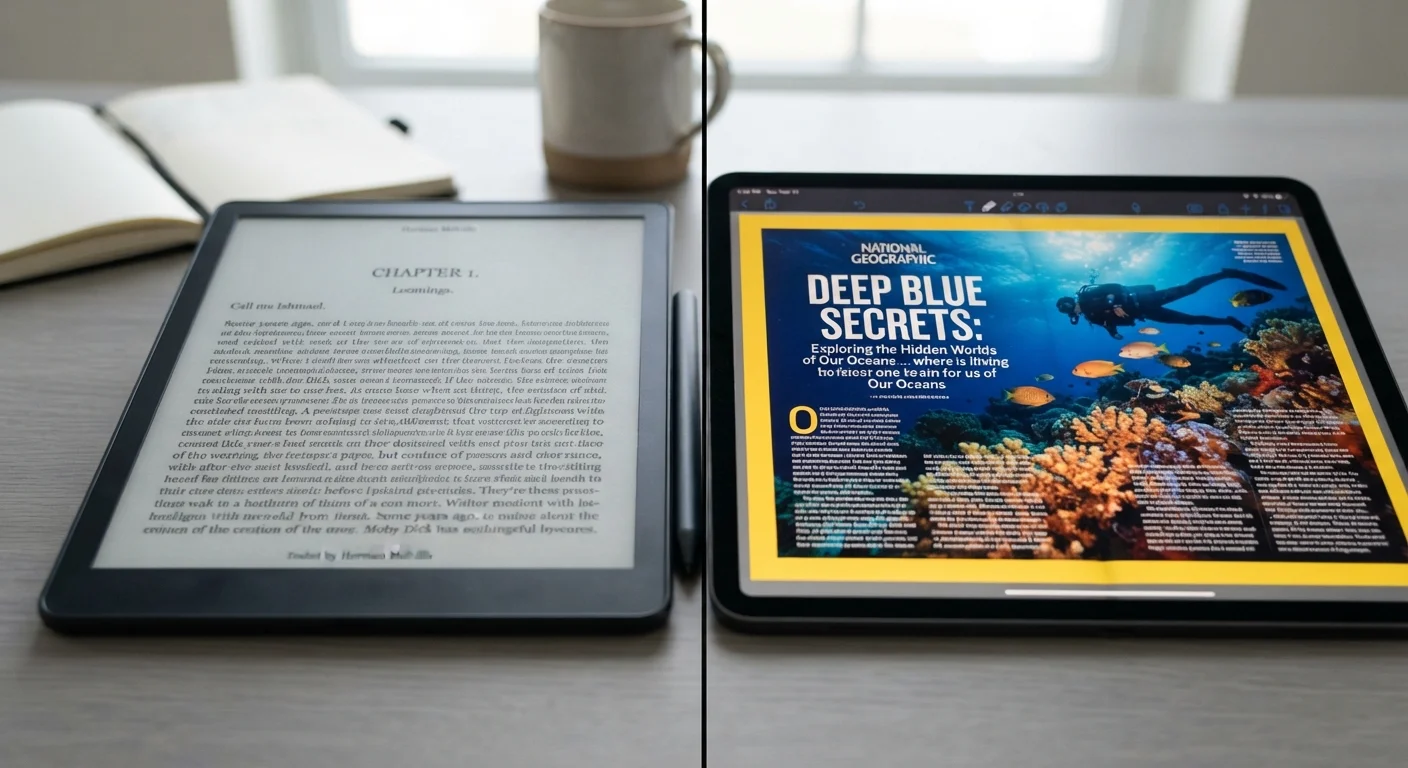
Key Takeaways
- E-ink screens reflect ambient light like paper, reducing the blue-light exposure associated with eye fatigue in long sessions.
- LCD tablets use a backlight and refresh continuously, enabling video, color apps, and high refresh rates that e-ink cannot match.
- E-ink's low power draw - only consuming energy when the image changes - can deliver weeks of battery life on a single charge.
- E-ink refresh rates are measured in seconds, not milliseconds, making them unsuitable for animation, video, or fast-scrolling content.
- Neither display type is universally superior; the right choice depends on primary use case, reading environment, and content type.
Option A
E-Ink Tablets
The paper-like display built for sustained reading comfort.
Best for: Readers who spend hours on long-form text and prioritize eye comfort and battery longevity over multimedia versatility.
Option B
LCD Tablets
The full-color, high-refresh workhorse for versatile use.
Best for: Users who need a single device for reading, video, browsing, note-taking, and apps with rich color and fast screen response.
If you primarily read books, articles, or documents for hours at a time
E-Ink Tablets
The reflective, paper-like surface and absence of a continuous backlight make extended text reading significantly more comfortable for most users.
If you want one device for reading, streaming, and productivity
LCD Tablets
LCD screens handle color media, apps, and fast-scrolling content that e-ink simply cannot render smoothly.
If you read frequently outdoors or in bright sunlight
E-Ink Tablets
E-ink displays become more legible in bright light, unlike LCD panels that can wash out and require higher brightness - draining battery faster.
If note-taking, sketching, or stylus input is a priority
LCD Tablets
Most LCD tablets offer lower-latency stylus response, and color display better supports annotation workflows and visual content.
How Each Display Technology Actually Works
Understanding the reading experience begins with understanding the physics of each panel type. E-ink - short for electronic ink - uses millions of tiny microcapsules filled with negatively charged black particles and positively charged white particles suspended in fluid. An electric charge rearranges these particles to form text and images. Critically, once an image is set, no power is needed to hold it. The screen only draws energy when the display changes.
LCD (Liquid Crystal Display) panels work very differently. A backlight - typically LED-based - shines through a layer of liquid crystals whose orientation is electrically controlled to pass or block light. Color filters then produce the full color spectrum. The backlight is always on while the screen is active, and the image refreshes at a fixed rate (commonly 60Hz to 120Hz) to redraw content continuously.
This fundamental difference - reflected light versus transmitted light - shapes nearly every experiential trade-off between the two. For a deeper look at how LCD compares to another emissive display technology, see how OLED and LCD panels differ.
Reading Comfort and Eye Strain Over Long Sessions
Eye comfort during extended reading is one of the most commonly cited reasons readers gravitate toward e-ink. Because e-ink screens reflect ambient light rather than projecting it, they behave more like printed paper. There is no backlight shining directly into your eyes. Research into screen-related eye discomfort - sometimes called digital eye strain or computer vision syndrome - points to factors including blue-light exposure, screen glare, and continuous muscle effort from tracking a flickering or bright source. E-ink eliminates backlight flicker and, in non-frontlit modes, blue-light exposure almost entirely.
LCD tablets address this partly through software features like night modes, blue-light filters, and adaptive brightness. Some panels also use PWM (pulse-width modulation) dimming, which can introduce low-level flicker at reduced brightness settings - a known irritant for light-sensitive users. Higher-end LCD panels increasingly use DC dimming to avoid this.
Color E-Ink Is an Emerging Middle Ground
A newer category of color e-ink panels exists and is appearing in some reading devices. These panels use additional color filter layers to display limited color - useful for comics, illustrated books, and magazines. However, color e-ink currently produces less vivid, less saturated color than LCD, and refresh rates remain slow. It occupies a niche between classic grayscale e-ink and full LCD, and the technology continues to evolve.
For casual or short reading sessions, most users find LCD tablets perfectly acceptable. The comfort difference between display types becomes more pronounced during sessions exceeding an hour or two, particularly in lower-light environments.
Refresh Rate: Where E-Ink Has a Fundamental Ceiling
Refresh rate measures how many times per second a display redraws its image - expressed in hertz (Hz). LCD tablets typically refresh at 60Hz to 120Hz, meaning the screen updates 60 to 120 times per second. This enables smooth video playback, fluid scrolling, and responsive touch interaction. Some tablets push to 120Hz or higher for gaming and stylus use. For more on what refresh rate differences feel like in practice, see why 120Hz feels different from 60Hz and when refresh rate actually matters.
E-ink refresh rates are a different category entirely. A full-screen refresh on a typical e-ink display takes roughly 120-500 milliseconds - a fraction of a second that's imperceptible for turning pages in a book, but highly noticeable when scrolling through a webpage or typing. Many modern e-ink devices offer a partial refresh mode that speeds up response for typing but introduces ghosting artifacts - faint residual traces of previous content - that require periodic full refreshes to clear.
| Criterion | E-Ink Tablets | LCD Tablets |
|---|---|---|
| Display type | Reflected ambient light | Transmitted backlight |
| Typical refresh rate | 0.1-0.5 seconds per page | 60Hz-120Hz (continuous) |
| Battery life (reading use) | Days to weeks | 6-12 hours |
| Eye strain in long sessions | Generally lower (no backlight) | Higher; mitigated by filters |
| Outdoor legibility | Excellent in bright light | Can wash out; needs high brightness |
| Color support | Grayscale (color e-ink emerging) | Full color, high saturation |
| Video and animation | Not supported | Fully supported |
| App ecosystem | Limited (reading-focused) | Full app ecosystem |
This ceiling makes e-ink unsuitable for video content, fast-paced games, or any application where fluid motion is part of the experience.
Battery Life and Real-World Portability
E-ink's power consumption model is unusual compared to every other display category. Because the image is held statically without ongoing power draw, a device only uses meaningful battery when the screen changes. This translates to battery life measured in weeks for typical reading use - a meaningful practical advantage for travelers, commuters, or anyone without reliable charging access.
LCD tablets consume power continuously to maintain the backlight, regardless of whether content on screen is changing. Battery life for general use typically ranges from 6 to 12 hours depending on screen brightness, processor activity, and connectivity use. This is competitive with laptops - see how tablets compare to laptops in hardware terms - but is a different category from what e-ink offers for single-purpose reading.
~6-8 weeks
Typical e-ink battery life on standby
E-ink manufacturers commonly cite multi-week standby performance, with active reading use typically yielding several weeks per charge depending on page turns and wireless usage.
120-500ms
E-ink full-screen refresh time
This refresh window is acceptable for page-turn reading but creates visible lag for web scrolling, typing feedback, and any animated content.
~35%
Blue-light reduction vs. LCD (no frontlight)
Reflective e-ink without a frontlight eliminates direct blue-light emission entirely; frontlit e-ink models with warm light modes vary by implementation.
For users who primarily read and rarely need to charge on the go, e-ink's battery advantage is substantial. For users running apps, streaming media, or keeping the screen active for hours at varied tasks, LCD's shorter but more flexible runtime is an acceptable trade-off.