

Key Takeaways
- SSDs store data using flash memory chips with no moving mechanical parts.
- The absence of spinning platters makes SSDs faster, quieter, and more durable than traditional hard drives.
- NAND flash memory retains data without power by trapping electrical charges in transistors.
- SSDs have a finite number of write cycles, but modern drives are engineered to last many years under normal use.
- Understanding SSD technology helps explain why device speed and storage capacity affect your experience differently.
Solid-State Drive (SSD)
A solid-state drive is a data storage device that holds information using flash memory chips rather than spinning magnetic disks. Because there are no moving mechanical parts, SSDs can retrieve and write data significantly faster than traditional hard drives. They are now the default storage technology in most laptops, smartphones, and tablets.
SSDs use NAND flash memory - a non-volatile storage medium that retains data without a continuous power supply by trapping electrical charge within floating-gate or charge-trap transistors.
How a Hard Drive Actually Works - and Why It Has Limits
To understand why SSDs matter, it helps to know what they replaced. A traditional hard disk drive (HDD) stores data magnetically on one or more rigid, rapidly spinning platters - typically rotating at 5,400 to 7,200 revolutions per minute. A tiny read/write head floats just nanometers above the platter surface, magnetizing microscopic regions to record ones and zeros, and sensing those regions to read them back.
The mechanical choreography is impressive engineering, but it introduces unavoidable delays. Every time your device needs a file, the drive must physically move the head to the right track and wait for the correct sector to rotate into position. These delays - measured in milliseconds - add up across thousands of operations and set a hard ceiling on how fast a mechanical drive can respond.
Vibration, drops, and temperature swings can also displace the read head or damage platters, making HDDs a weak point in any portable device. Device slowdowns are often traced directly to aging or overtaxed spinning drives.
Flash Memory: Storing Data Without Motion
SSDs replaced spinning platters with NAND flash memory - the same fundamental technology inside USB thumb drives and memory cards, but engineered to far higher standards of speed and endurance. Flash memory is non-volatile, meaning it retains stored data even when the power is off, unlike RAM.
The core unit of flash storage is a floating-gate transistor. In its simplest form, data is stored by injecting or removing electrons from an electrically isolated region called the floating gate. The presence or absence of trapped charge represents a binary 1 or 0. Because electrons can be precisely controlled using voltage - no physical movement required - data can be written and read in microseconds rather than milliseconds.
~100µs
Typical SSD read access time
SSD random read latency is commonly measured in microseconds, versus roughly 5-10 milliseconds for mechanical hard drives - a difference of up to 100x.
3D NAND
Dominant flash architecture in modern SSDs
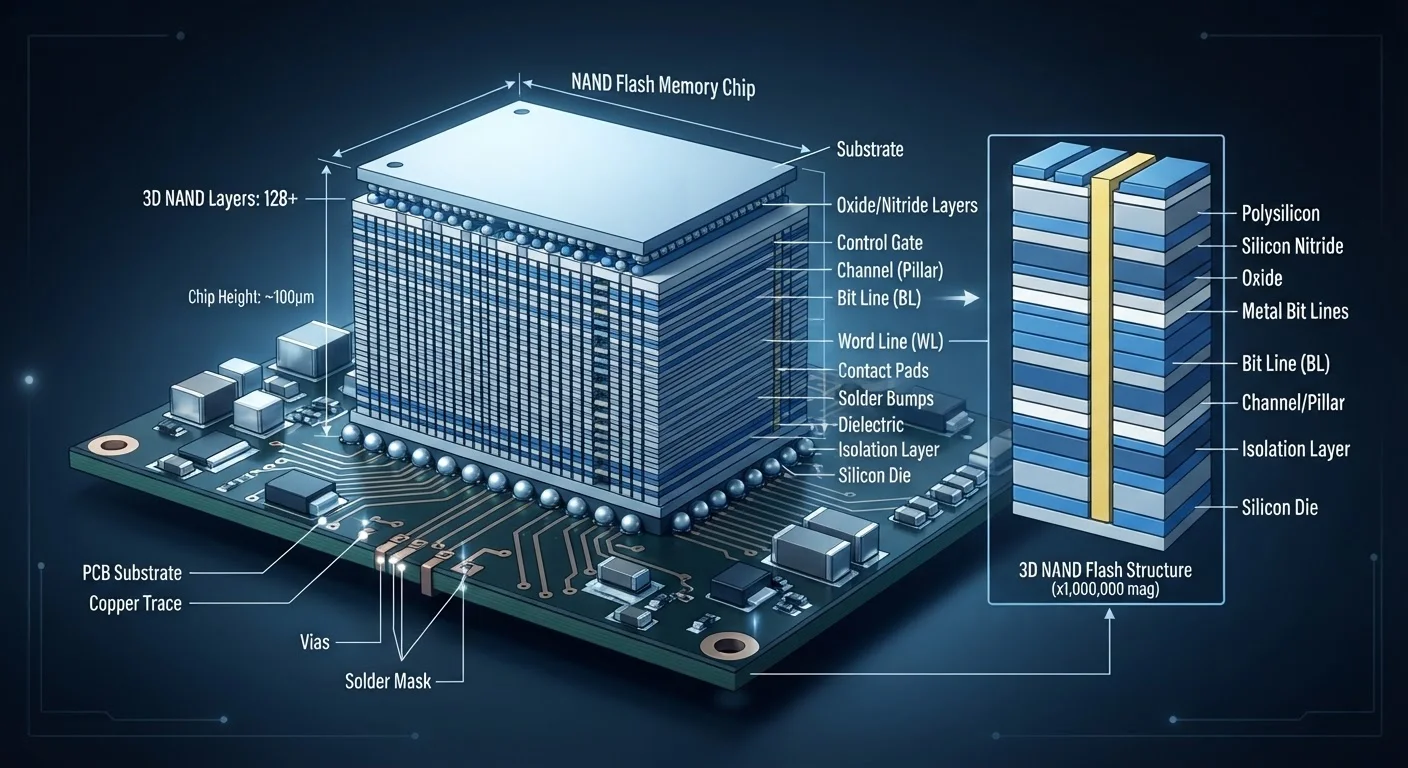
Most consumer and enterprise SSDs shipped today use 3D NAND, which stacks memory cells vertically to increase density and reduce cost per gigabyte.
~30-50%
Typical power reduction vs. HDD
SSDs generally consume significantly less power than spinning hard drives during active use, contributing to improved battery life in portable devices.
Modern SSDs stack these transistors into dense 3D layers, dramatically increasing capacity without expanding the physical footprint of the chip. A single M.2 SSD (a common slim form factor found in laptops) can hold several terabytes of data in a chip smaller than a stick of gum.
The Tradeoffs You Should Know About
SSDs are not unconditionally superior in every respect. The most important limitation is write endurance. Each time a flash memory cell is erased and rewritten, the insulating layer around the floating gate degrades slightly. Over many thousands of cycles, cells become unreliable. Drive manufacturers rate SSDs in TBW - the total volume of data that can be written before the drive approaches the end of its reliable lifespan.
Check Your Drive's Health Periodically
Most operating systems and free diagnostic utilities can read S.M.A.R.T. (Self-Monitoring, Analysis, and Reporting Technology) data from your SSD, giving you an estimate of remaining write capacity and any error conditions. Checking this once or twice a year on a heavily used machine is a practical habit for anyone storing irreplaceable files locally.
To manage this, SSDs use a technique called wear leveling, which spreads write operations evenly across all available cells rather than repeatedly hitting the same locations. Most consumer drives are rated for workloads that, under typical everyday use, would take years to exhaust.
Cost per gigabyte has also historically been higher for SSDs than HDDs, though that gap has narrowed considerably. For readers weighing where their files should live, our overview of cloud storage vs. local storage explores another dimension of this decision.
Why This Technology Reshaped Modern Devices
The shift to SSDs did more than just speed up file access. Eliminating spinning parts allowed device designers to make laptops thinner, lighter, and far more resistant to physical shock. It also dramatically reduced power consumption - a motor spinning thousands of times per minute draws significant energy, while flash memory reads are far more efficient, benefiting battery life. For a deeper look at how energy storage affects your devices, see our piece on the battery technology inside your devices.
The performance difference is tangible: devices with SSDs typically boot in seconds and launch applications almost instantly, while the same hardware with an HDD may take considerably longer to accomplish the same tasks. This gap explains much of the perceived slowness that users associate with aging computers - and why storage technology is one of the most consequential components under the hood.
This article is for informational and educational purposes only. Storage performance and device lifespan vary by manufacturer, usage patterns, and specific hardware configuration.